Apply Online for PM Awas Yojana Urban 2.0
In shortOfficial website
- You can apply on the official scheme website, pmaymis.gov.in, at a nearby CSC or at your municipal office.
- You need the Aadhaar of every family member, and one Aadhaar number can be used for only one form.
- The form has four parts: the eligibility check, Aadhaar OTP, the survey form and, at the end, your application number.
- Keep your application number safe, because that’s how you check your status later.
Where to apply for PM Awas Yojana Urban 2.0
According to the scheme’s official FAQ, an eligible family can apply in three places. The form is the same everywhere; only the way you fill it in changes:
Before you apply, check whether you’re eligible. Who qualifies, and how much help each income group gets, is explained in PM Awas Yojana Urban 2.0 eligibility.
What to keep ready before applying
The official scheme website lists the required documents before the form starts. So the form doesn’t stall halfway, have these ready:
- Your AadhaarYour Aadhaar number, name as on Aadhaar and date of birth. Keep the mobile linked to Aadhaar with you too, because the OTP goes there.
- Family members’ AadhaarThe Aadhaar number, name and date of birth of your husband or wife and unmarried children.
- Parents’ detailsThe form also asks for your father’s and mother’s names (as on Aadhaar) and their Aadhaar numbers.
- Bank accountAn active bank account in your name that is linked to Aadhaar: account number, bank, branch and IFSC code.
- Income certificateAs a PDF, up to 100 KB. You have to upload it in the form.
- Land documentOnly if you are building on your own land (BLC), such as the registry. As a PDF, up to 1 MB.
Scan your income proof and land document into PDFs beforehand and check their size, or the form can get stuck at the upload.
How to fill the PM Awas Yojana Urban 2.0 online form
On the official scheme website, the whole application takes four stages:
- Eligibility checkState, income and vertical
- Aadhaar OTPConfirm who you are
- Survey formFamily, address and bank
- Save and numberGet your application number
1Open the website and check eligibility
- Open the website. Open the official scheme website. If a notice pops up saying you don’t need to pay anyone to apply, close it.
- Choose “Apply for PMAY-U 2.0”. It’s in the menu bar at the top of the home page. A new application starts here.
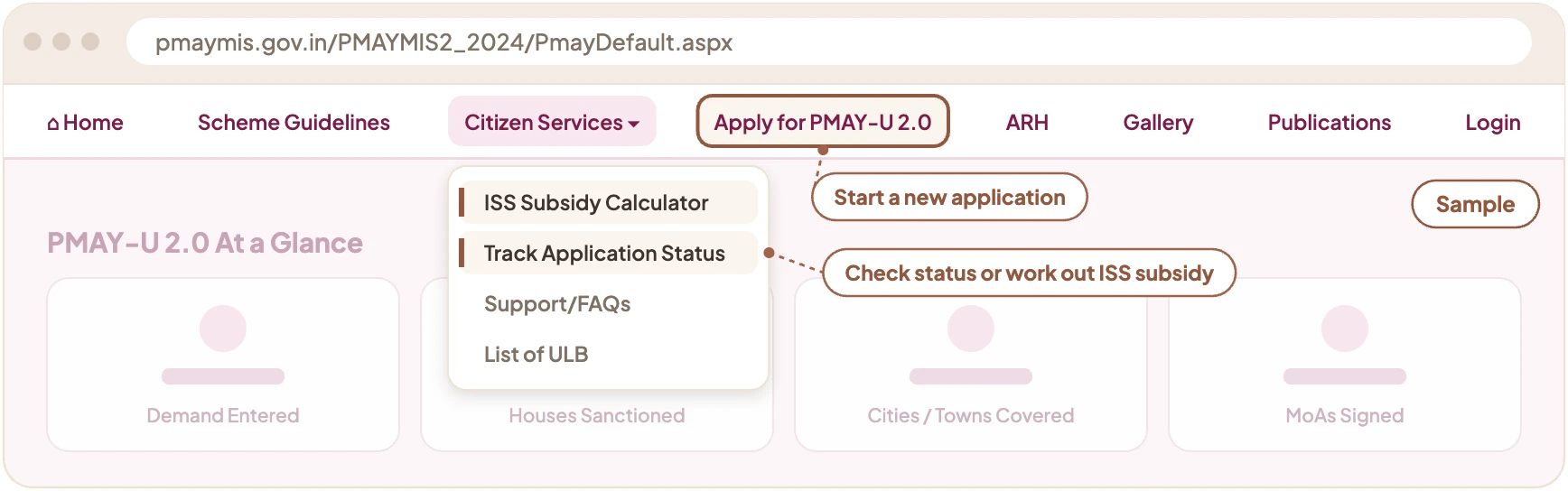
- Read the instructions and the document list. The first page explains the scheme’s four verticals; press “Click to Proceed” at the bottom. The next page lists the documents you need; press “Proceed”.
- Fill in the eligibility form. Pick the state where the house will be built or bought. Enter the family’s yearly income as a full amount, such as 250000. Then choose the vertical: building on your own land (BLC), buying an affordable house (AHP) or the home loan interest subsidy (ISS). Answer whether you own a pucca house anywhere in India and whether you’ve had benefits from any housing scheme in the past 20 years. Finally, press “Eligiblity Check”.
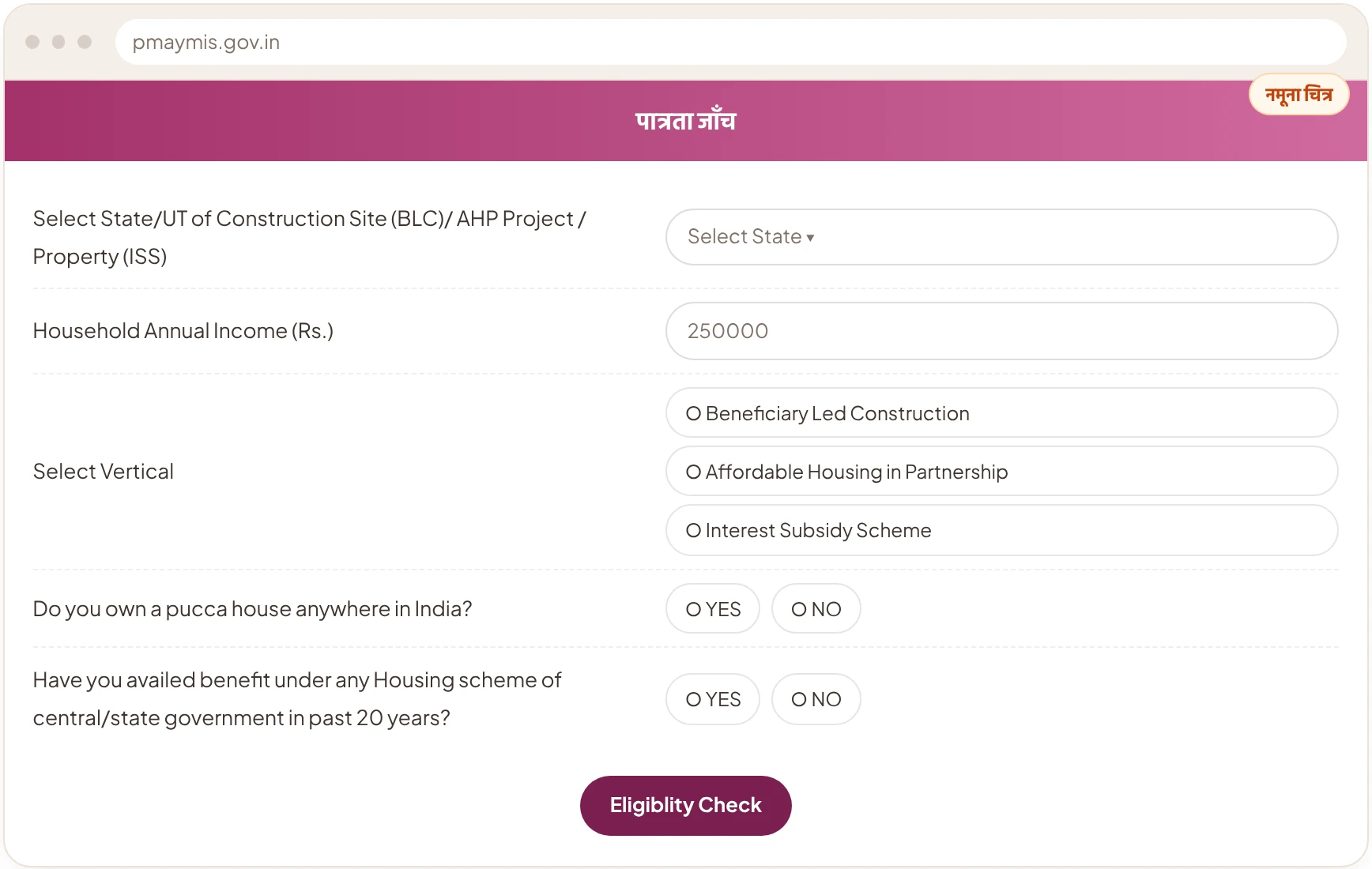
This form only offers BLC, AHP and ISS. You can’t apply for rental housing (ARH) here.
2Get an OTP through Aadhaar
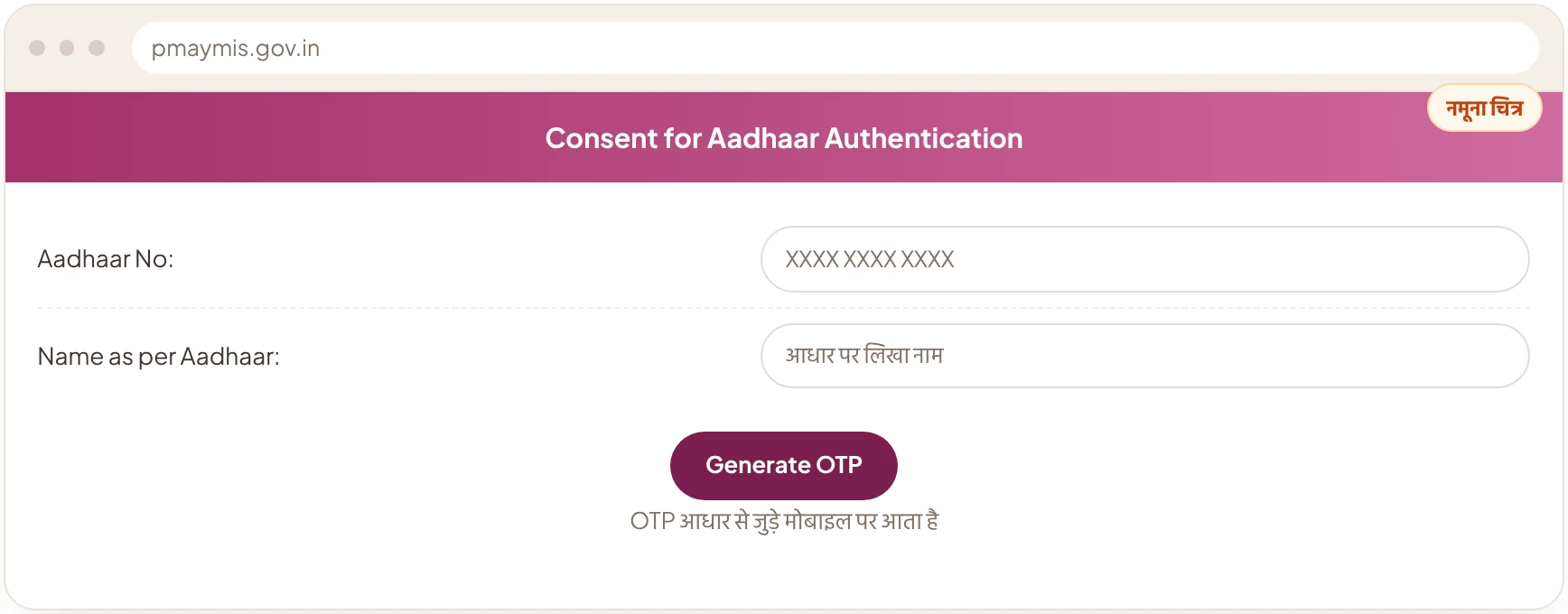
- Enter your Aadhaar number and name. If you’re eligible, the “Consent for Aadhaar Authentication” page opens. Enter your Aadhaar number and type your name exactly as it appears on Aadhaar.
- Enter the OTP and submit. Tick the consent for Aadhaar verification, press “Generate OTP”, then enter the OTP sent to your mobile and submit.
3Fill in the survey form
After the OTP, your name and Aadhaar number fill in on their own. The rest of the form asks about you, your family, your address and your bank. What it asks for is set out separately below.
4Save and get your application number
- Tick the declaration. Tick the “I hereby declare” box to confirm that the details you’ve given are correct.
- Press “Save”. As soon as the form is submitted, you get an application number, and a message also comes to your mobile. Write it down or take a screenshot.
One Aadhaar number can be used for only one form. So only one person should apply for the family, and check everything carefully before pressing “Save”.
What the survey form asks for
The survey form that opens after the Aadhaar OTP is long. It’s easiest to think of it in five parts:
About you
Address
Where you live now, and your permanent address. If they’re the same, tick “same as present”. Add your mobile number too; email is optional.
Where the house will be
The address where the house will be built or bought. Under BLC, this is where you upload the land document. You’re also asked how many years you’ve lived in that town, and whether your current home is your own, rented, or you have no home.
Family members
Each member’s name, date of birth, relationship to you, gender, Aadhaar number and work. Press “Add” to add more members.
Bank and other schemes
Your account number twice and the IFSC code, which is printed in your passbook. Then you answer yes or no about some schemes, such as PM SVANidhi, PM Vishwakarma, Ayushman Bharat and Ujjwala.
Enter your name, date of birth and Aadhaar number everywhere exactly as they are on Aadhaar. Mistakes here are the most common reason applications get stuck.
What the eligibility check looks at
The eligibility check depends on which vertical you’re applying for. Under the scheme rules, the income limits are:
| Vertical | Yearly income limit | What else is checked |
|---|---|---|
| BLC and AHP | Up to ₹3 lakh | No pucca house anywhere in India, and no benefit from any housing scheme in the past 20 years |
| ISS | Up to ₹9 lakh | Loan up to ₹25 lakh, house worth up to ₹35 lakh, house up to 120 sq m, and a declaration that you haven’t had benefits from any housing scheme in the past 20 years |
If any of these conditions isn’t met, the form won’t go further. So fill in your income and housing details truthfully, because they are checked later.
What happens after you apply, and how to check your status
Submitting the form doesn’t mean the help has been approved. After you apply, this is what usually happens:
- The municipal body checks itYour town’s urban local body checks the details in your application. A team may also visit your home or land.
- A project is put togetherThe state government groups the checked applications into a project and sends it to the Centre.
- The Centre approves itA central committee gives approval, and after that the money starts coming.
How to check your status: use our PM Awas Yojana Urban 2.0 application status check. Type your application ID to see whether the application is approved and which housing project it is attached to.
If you applied for the home loan interest subsidy (ISS), keep checking with your bank or housing finance company too, because the subsidy reaches your loan account through them.
What to keep in mind when applying
Do
- Enter your name exactly as it’s written on Aadhaar.
- Fill in complete and correct details for every family member.
- Keep your application number and a screenshot of the form safe.
- Fill in the form only on the official website, pmaymis.gov.in.
Don’t
- Don’t fill several forms for the same family using different Aadhaar numbers.
- Don’t understate your income or give wrong housing details; they are checked later.
- Don’t share your OTP, Aadhaar number or application number with any agent.
- Don’t pay anyone who promises quicker approval.
Common questions about applying
Where do I apply online for PM Awas Yojana Urban 2.0?
You apply online on the official scheme website, pmaymis.gov.in. If you prefer, you can also apply at a nearby Common Service Centre (CSC) or your municipal office.
What documents do I need to apply for PM Awas Yojana Urban 2.0?
You need the Aadhaar of the applicant and every family member, the mobile linked to Aadhaar, a bank account linked to Aadhaar and an income certificate (PDF, up to 100 KB). To build on your own land (BLC), you also need a land document.
Can one family fill in two forms?
No. One Aadhaar number can be used for only one form, and a family gets the scheme’s benefit only once. So only one person should apply for the family.
How do I check my PM Awas Yojana Urban 2.0 status?
Type your application ID in our PM Awas Yojana Urban 2.0 application status check. You’ll see whether it is approved, its component and the housing project it is attached to.
Can I apply for PM Awas Yojana Urban 2.0 without Aadhaar?
Aadhaar, or an Aadhaar Virtual ID, is required for the applicant and family members. Anyone without Aadhaar has to get one made first.
Awas Score
Will your family’s turn come under this scheme?
Find out your family’s Awas Score in 2 minutes.
Get my Awas Score