PM Awas Yojana Gramin Family Member Details Check
No match. Check the spelling.
Don’t know your registration number?
Find it in the Gramin listWhat are PM Awas Yojana Gramin family member details?
Families getting a house under PM Awas Yojana Gramin came onto the list through two kinds of survey. The first list was made from SECC 2011, the Socio-Economic and Caste Census 2011. Families missed in it were added later through the Awaas+ survey.
Both surveys recorded details of every family member. On the official PMAY-G website, these details appear under “family member details”. They show who from your household was recorded in the survey, and how each person’s details were written down.
Remember, these pages only show the family’s record. Whether your house was sanctioned and how far your instalment has got shows up in your beneficiary details.
Free on Awas Score
How to check PM Awas Yojana Gramin family member details on Awas Score
The quickest way is the free tool at the top of this page. Our lookup engine works out which survey your family is in from your number, finds the record and shows it here. No sign-up, no fee.
- Choose your state.
- Type your number. Your registration number works, for example UP1234567. So does your family ID: the 7-digit PMAY ID for SECC 2011 families, or the 9-digit Awaas+ ID. You don’t have to pick the survey.
- Click Show family members.
- If a question appears, answer it. Most of the time your record opens straight away. Sometimes a short check question appears in the tool: type your answer and click Check. If it’s hard to read, click Different question. You have a few minutes to answer.
- See who is recorded. The tool shows every family member recorded in the survey, with their name and relation, and their age or date of birth.
Tip: already checked your record in our beneficiary details tool? Its link to your family members opens this tool with your state and number filled in. If no family is found, check the state and the number.
What’s the difference between SECC and Awaas+ family member details?
Both pages do the same job. They just show records from different surveys. Open the page for the survey your family’s name came from:
If you don’t know which survey your name came from, look up your ID in the village list as explained below, then try both pages one after the other.
Where to find your PMAY ID or Awaas+ ID
You need your family’s ID to see family member details. SECC families need their PMAY ID, and Awaas+ families need their 9-digit Awaas+ ID.
The public village lists on the website no longer show these IDs. They show the family’s registration number instead. So ask the gram panchayat secretary or the block office for your family’s PMAY ID or Awaas+ ID; they keep the panchayat’s survey records. Write it down, then use it in the steps below.
If your house has already been sanctioned, you may not need these IDs at all. The registration number in your village list opens your full record in PM Awas Yojana Gramin beneficiary details.
How to check SECC family member details
The form has just three boxes, so keep these three things ready first:
Now follow these steps:
- Open the official PM Awas Yojana Gramin website, pmayg.dord.gov.in, in the browser on your phone or computer.
- Click Stakeholders in the top menu.
- In the list that opens, choose the second option, SECC Family Member Details.
- Choose your state under State and type your family’s PMAY ID in the PMAYID box.
- Type the answer to the captcha sum in the Answer box. If the question isn’t clear, press the ↻ button next to it for a new one.
- Click the green Get Family Member Details button. A table of your family members will open below.
What does the SECC family member details result show?
As soon as you press the button, a table of all family members opens. The picture below shows how this record lays out a family. The names in it aren’t real, just examples.
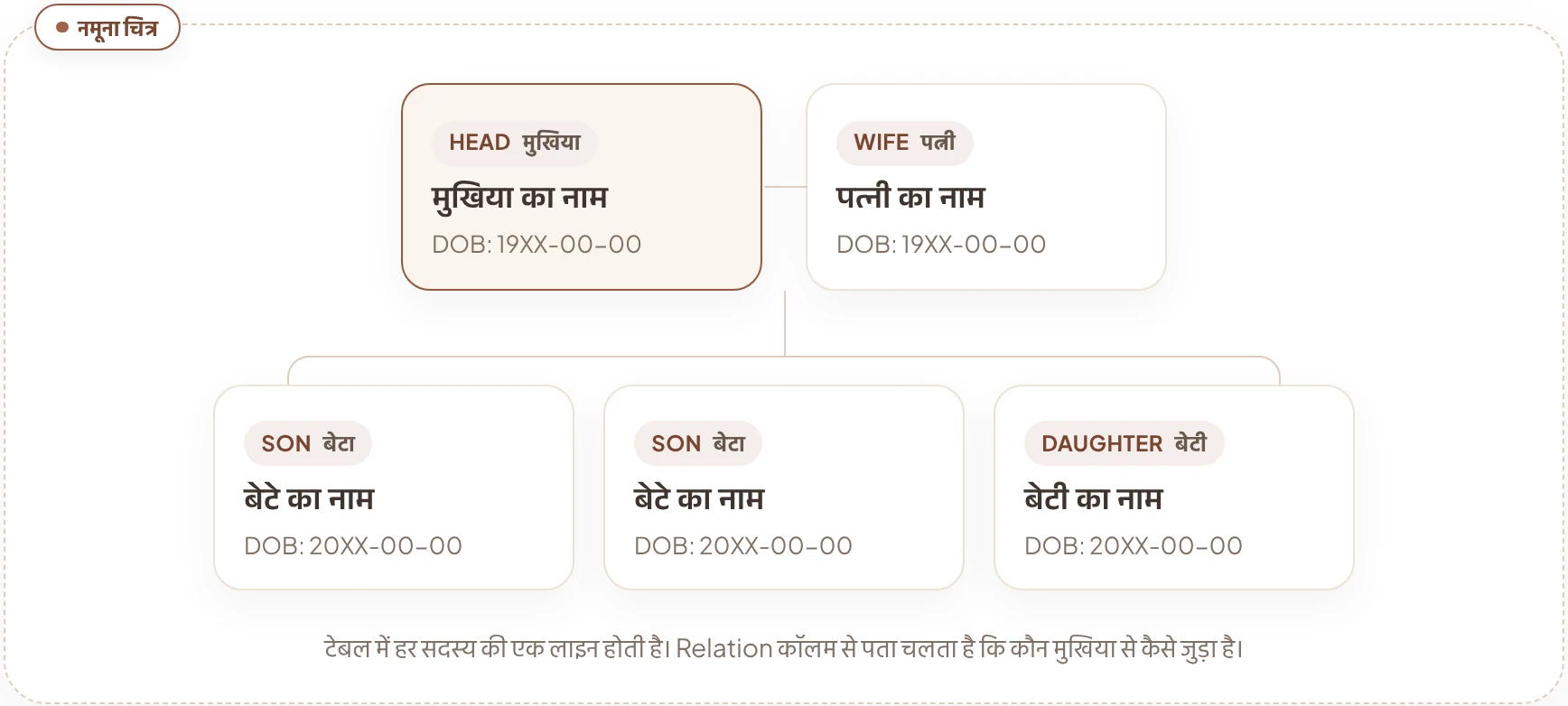
The table has seven columns in all. Here’s what each one means:
AHL_TINThe member’s ID number in the SECC 2011 record. It’s quite a long number, and each member has their own.
NameThe member’s name, spelt exactly as it was written in the survey.
Father_NameThe member’s father’s name.
Mother_NameThe member’s mother’s name.
DOBDate of birth, in year-month-day order. For many members, the month and day show as 00, as in 1975-00-00.
pmayidThe PMAY ID column. In many records it may be empty.
RelationRelation to the head of the household: HEAD means the head, WIFE the wife, SON a son and DAUGHTER a daughter. Other relations, such as the head’s mother, are written the same way.
How to check Awaas+ family member details
If your family’s name came onto the list through the Awaas+ survey, the method is almost the same. Only the menu option and the ID are different:
- Open the official PMAY-G website, pmayg.dord.gov.in, and click Stakeholders in the top menu.
- In the list that opens, choose AwaasPlus Family Member Details.
- Choose your state and type your family’s 9-digit Awaas+ ID.
- Type the answer to the captcha sum and press the Get Family Member Details button.
What does the Awaas+ family member details result show?
When you press the button, a table of family members opens. Instead of dates of birth and parents’ names, it shows age and gender. The picture below shows how each member’s ID is made. The numbers in it aren’t real, just an example.
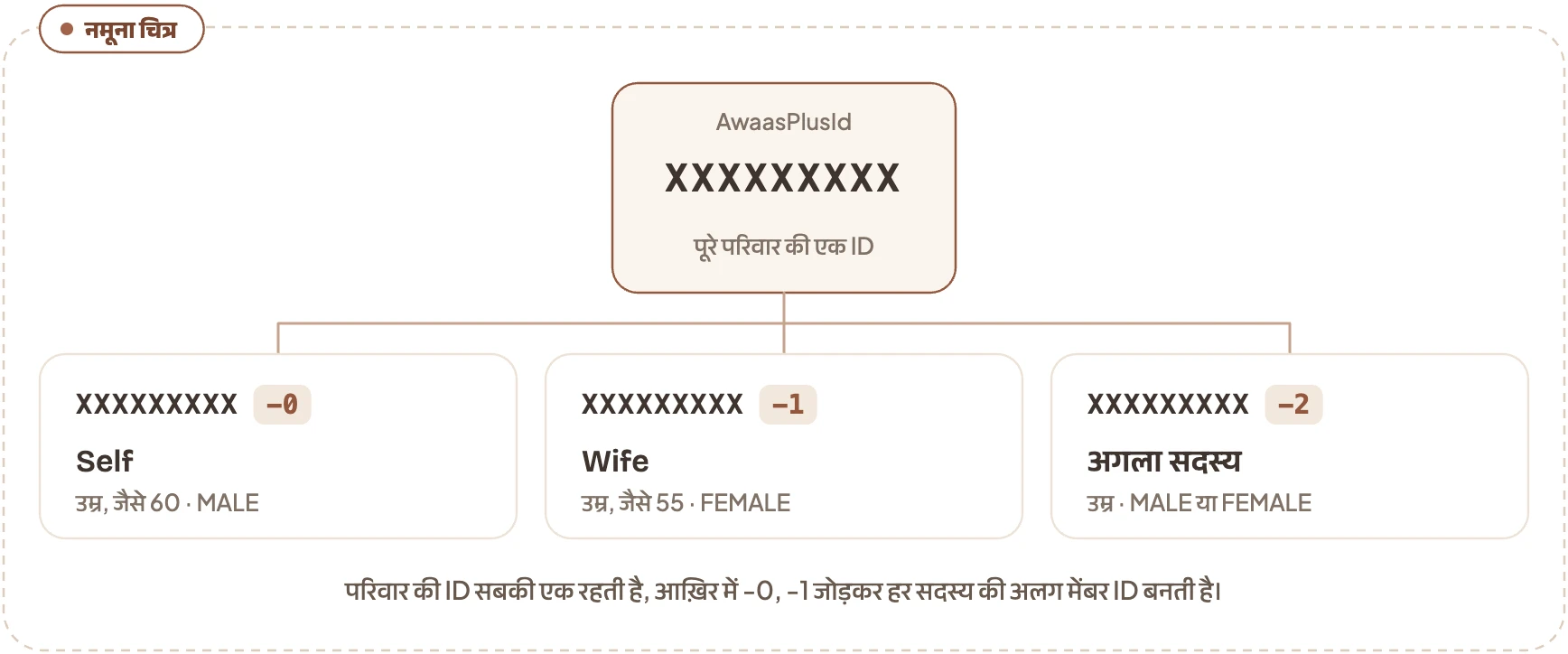
The table has six columns in all:
AwaasPlusIdThe family’s 9-digit Awaas+ ID. It’s the same on every row.
MemberIdThe member’s own ID: the family ID followed by a number like -0 or -1.
NameThe member’s name, as written in the survey.
AGEThe member’s age, in years.
GenderMALE or FEMALE.
RelationSelf is the person on the -0 row. Every other member’s relation is given to them, such as Wife.
What to do if family member details look wrong
When the result opens, check these three things carefully:
- Names and spelling: Is each member’s name spelt correctly? In the SECC record, check the parents’ names too.
- Relation: Is each member’s relation right, especially who is recorded as head (HEAD) or Self?
- Missing members: The SECC record is from 2011, so children born after that, or people who joined the family through marriage, won’t be in it. That on its own isn’t a mistake.
If you spot a mistake in the record, or nothing opens with your ID, take a printout or screenshot of the record and talk to the gram panchayat secretary or block office. If no one listens, here’s where to complain about PM Awas Yojana Gramin.
How were families chosen from SECC 2011?
SECC 2011 recorded details of every rural family. After that, families were sorted like this:
All rural familiesEvery family recorded in SECC 2011
Each family went into one of three groups
- Left out straight awayFamilies who owned any of the listed assets or facilitiesAbout 39% of families
- Put in straight awayHomeless families, those living on alms, manual scavenger families, primitive tribal groups and legally freed bonded labourers5 categories, under 1% of families
- Assessed on deprivationAll the other families, checked on 7 kinds of deprivation
For PM Awas Yojana Gramin, from the families not left out
Permanent wait listHomeless families and families in kutcha houses with zero, one or two rooms, after the gram sabha check
According to PIB, almost every family on this SECC 2011 list has now had a house sanctioned, and the Awaas+ survey was done for families who were missed.
The percentages above come from the government’s replies in Parliament. See who gets a PM Awas Yojana Gramin house first, and who is left out.
Common questions about family member details
What do I need to check PM Awas Yojana Gramin family member details?
Just three things: your state, your family’s ID and the answer to the captcha sum. SECC families need their PMAY ID, and Awaas+ families need their 9-digit Awaas+ ID. Fill these in and press the button on the official PMAY-G website.
Where do I find my PM Awas Yojana Gramin PMAY ID or Awaas+ ID?
Ask your gram panchayat secretary or block office. The public village lists on the PMAY-G website show each family’s registration number, not the PMAY ID or Awaas+ ID.
Can I check family member details with a name or Aadhaar number?
No. These forms only have boxes for the state and the family ID. The record doesn’t open with a name, Aadhaar or mobile number.
Does being in family member details mean I’ve got a house?
No. Family member details are just the family’s record from the survey. To see whether your house was sanctioned, check beneficiary details with your registration number.
Does it cost anything to check family member details?
No. Anyone can view this for free on the official PMAY-G website. If anyone asks for money to show you the record or add your name, don’t pay.
Awas Score
Seen your family’s record? Now check if you qualify
Find out in 2 minutes whether your family can get a house.
Get my Awas Score