PM Awas Yojana Gramin Beneficiary Details Check
Don’t know your registration number?
Find it in the Gramin listWhat are PM Awas Yojana Gramin beneficiary details?
When a family’s house is sanctioned under PM Awas Yojana Gramin, its full record is kept in the government’s online system and it gets a registration number. This record is called the “beneficiary details”. The house sanction, the instalments and how far the house has been built are all linked to this number.
Any beneficiary can view this record for free on the official PMAY-G website. If an instalment is late, or you want to make sure your name is recorded correctly, this is the first page to check.
Keep in mind that this page is only useful for families who already have a registration number. If only your survey has been done so far, check your name in the village list first. Here’s how to check the PMAY-G village list.
Free on Awas Score
How to check PM Awas Yojana Gramin beneficiary details on Awas Score
The quickest way is the free tool at the top of this page. Our lookup engine finds your record and shows it here in simple words, with the money already added up for you. No sign-up, no fee.
- Type your registration number. In the Registration number box, type it exactly as it’s written in the list or on your papers, for example UP1234567. Don’t have it? Find it in the PM Awas Yojana Gramin list.
- Click Check status.
- If a question appears, answer it. Most of the time your record opens straight away. Sometimes a short check question appears in the tool: type your answer and click Check. If it’s hard to read, click Different question. You have a few minutes to answer.
- Read your record. You’ll see your house status and inspections, the sanction, every instalment paid with its date and FTO number, how much money is still to come, and your location and bank details.
- Go further in one click. Click an FTO number to track that payment. Under More about your house, you can check your toilet, electricity, gas and water benefits or see your family members in the survey, with your details already filled in.
Tip: the tool searches by registration number only, not by name, Aadhaar or mobile number. If your record was sent back for correction, the tool tells you, so you can ask your block office what needs fixing.
How to check PM Awas Yojana Gramin beneficiary details on the official website
It’s all done on a single page. Below is a simple version of that page on the website, with what to do at each numbered spot:
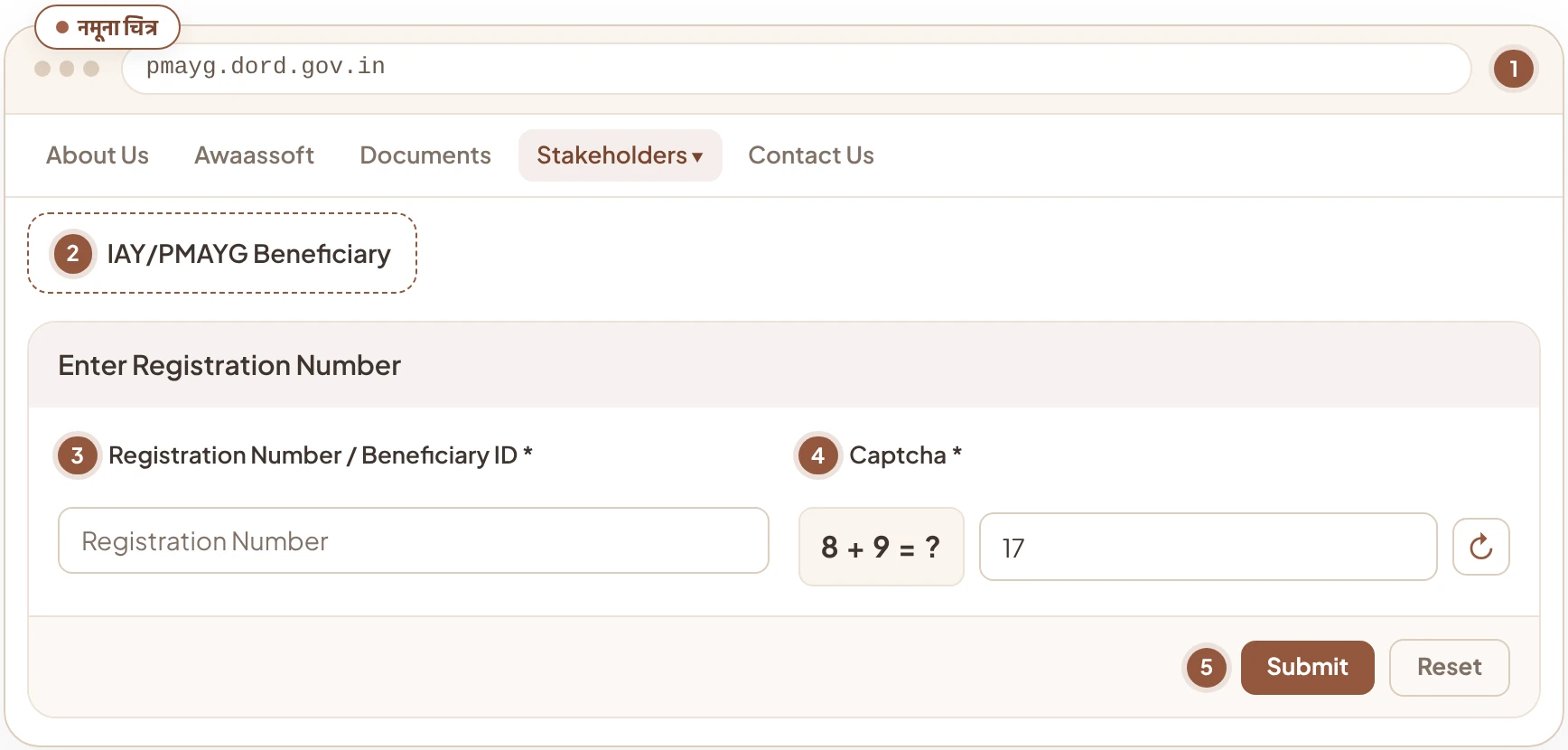
- 1Open the website. Open pmayg.dord.gov.in in the browser on your phone or computer. This is the official PM Awas Yojana Gramin website.
- 2Choose IAY/PMAYG Beneficiary under Stakeholders. In the blue menu bar at the top, go to Stakeholders. In the list that opens, click IAY/PMAYG Beneficiary. The “Search Beneficiary Details” page will open.
- 3Type your registration number. In the Registration Number / Beneficiary ID box, type your number exactly as it’s written in the list or on your papers.
- 4Answer the captcha. Here the captcha is a small sum, like 8 + 9 = ?. Type the answer in figures in the Answer box, so 17. If the question isn’t clear, press the ↻ button next to it for a new one.
- 5Press Submit. Your record will open. If you’ve typed something wrong, press Reset and fill it in again.
What do beneficiary details show?
As soon as you press Submit, your record opens. It has these parts:
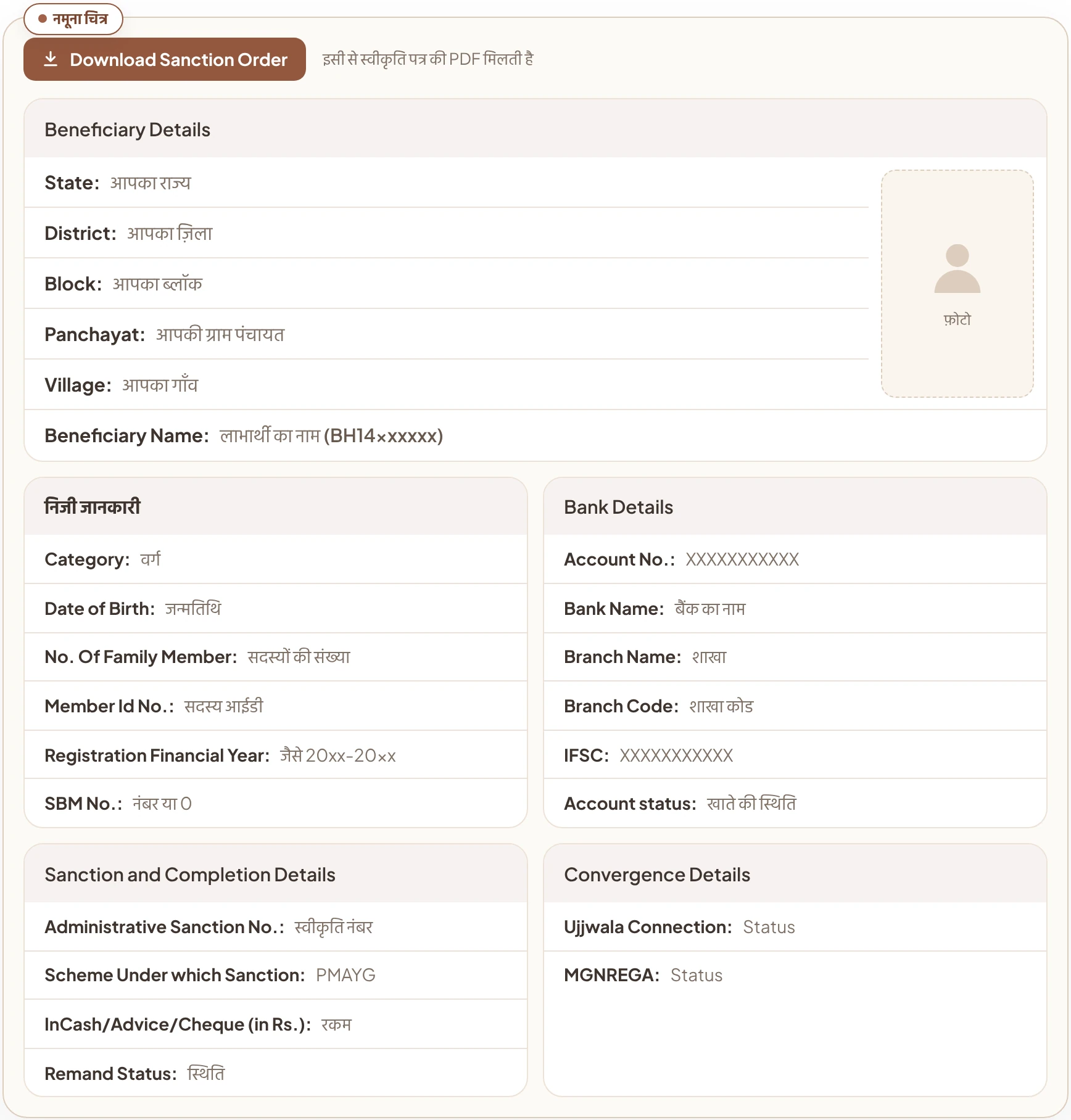
- Download Sanction Order: this button downloads your house’s sanction letter (sanction order) as a PDF. Save it on your phone or get it printed. It comes in handy when you deal with the panchayat, block office or bank later.
- State to village: State, District, Block, Panchayat and Village give the full location of your house. Check them carefully to be sure the record is yours.
- Beneficiary name: Beneficiary Name shows the name of the person the house was sanctioned to, with their registration number in brackets. The number starts with the state’s letters, such as BH in a Bihar record.
- Photo box: next to the name there’s a space for the beneficiary’s photo. It may show only a blank outline instead of a photo. Nothing to worry about.
- Personal details: this has the beneficiary’s category, date of birth, number of family members and Member Id No. Registration Financial Year shows which financial year you were registered in. SBM No. is the number linked to Swachh Bharat Mission (toilet); where it isn’t linked, it may show 0.
- Bank Details: the account number, bank, branch, branch code, IFSC and account status of the account your instalments go to are shown here. Be sure to match this with your passbook. A wrong account number or IFSC can hold up your instalment.
- Sanction and Completion Details: Administrative Sanction No. is your house’s sanction number, and Scheme Under which Sanction gives the scheme name (PMAYG). InCash/Advice/Cheque (in Rs.) shows payment amounts in rupees, and Remand Status shows whether the record has been sent back (remanded).
- Convergence Details: PM Awas Yojana Gramin is linked with benefits from other schemes too. This shows the status of your Ujjwala gas connection and MGNREGA. MGNREGA gives you paid workdays for building your house, so this status is worth checking as well.
If anything in the name, village or panchayat looks wrong, get it corrected using the steps below.
How to find your registration number
Many families have a sanctioned house but no record of the registration number. There are two easy ways to find it:
- From the village list. Open your gram panchayat’s beneficiary list on the website. It shows each beneficiary’s registration number next to their name. Here’s how to open the PMAY-G village list.
- From the panchayat or block office. The gram pradhan or panchayat secretary has the records of all beneficiaries in your panchayat. If that doesn’t work, ask at the block office.
Once you have the number, write it down in a notebook or on your phone. You’ll need it every time you check your instalments or house status.
What to do if you have trouble checking the details
Most people get stuck on one of these four problems when checking their record:
It says the captcha is wrong
Type the answer to the sum in figures only, with no spaces before or after. If it still doesn’t work, press ↻ for a new question.
The record doesn’t open with my number
Match the number with the village list. Often a digit or letter has been missed. If the number is right and it still won’t open, ask the panchayat secretary.
The next instalment hasn’t come
The next instalment comes only after a geo-tagged photo of the previous stage of the house is sent through the government’s AwaasApp and the block office checks it. Ask the panchayat secretary whether the photo has gone, or see the AwaasApp section. If the instalment has been sent but isn’t in your account, check the payment status with the FTO number.
There’s a mistake in the name or bank account
You can’t correct this yourself on the website. Take your Aadhaar card and bank passbook to the panchayat secretary or block office and tell them about the mistake. If that doesn’t work, file a complaint.
If your family’s name isn’t on any list, the record won’t open at all. First check PM Awas Yojana Gramin eligibility to see whether your family qualifies. If it does, get added in the new Awaas+ survey.
How to check your record on AwaasApp
Once the house is sanctioned, the other official tool a beneficiary uses is AwaasApp, built by NIC for the Ministry of Rural Development. On the website you can only view the record, but this app is also used to send in the progress of the house.
So if you want your instalments on time, each stage’s photo has to go on time. The beneficiary can send the photos themselves, or a panchayat worker can come and take them. If you no longer have the mobile number recorded at the time of sanction, talk to the panchayat secretary.
Where and how to complain
If there’s a mistake in your record, an instalment has been stuck for a long time, or someone is asking for money, you can complain. PM Awas Yojana Gramin handles complaints at four levels. Start with the panchayat, and if nothing happens, take it one level up. Each time, carry your registration number, Aadhaar card and any papers you have, like the sanction letter.
- 1Gram panchayatPradhan or panchayat secretary
Start here. Give your registration number and explain what’s wrong.
- 2Block officeBlock Development Officer (BDO)
If the panchayat can’t fix it, give a written complaint and keep the receipt.
- 3District officeDistrict rural development office
If the block office doesn’t act, take the complaint and the receipt here.
- 4State departmentState rural development department
The last level, if the district doesn’t sort it out either.
To complain online, use the Government of India’s grievance portal, CPGRAMS (pgportal.gov.in). The Ministry of Rural Development has told Parliament that PM Awas Yojana Gramin complaints are also taken on this portal. Here’s how:
- Register on the portal, then open the complaint form.
- Choose the department. If you can’t find the right one, choose “Not known / Not listed”. The complaint is then reviewed and sent to the right department.
- Always include your registration number, village and panchayat in the complaint. You can upload papers like the sanction letter with it.
- When you submit, you get a complaint number. Use it to keep checking the status. If you’re not happy with the reply, the portal also lets you appeal.
Keep in mind that the ministry sends such complaints to your state government for action. So the more clearly you write the location and number, the faster action will be taken. Complaints sent by email are not taken on this portal.
Common questions about beneficiary details
Can I check PM Awas Yojana Gramin beneficiary details with my Aadhaar number?
No. The beneficiary page on the official PMAY-G website only has a box for the registration number or beneficiary ID. The record doesn’t open with an Aadhaar or mobile number.
Does it cost anything to check PM Awas Yojana Gramin beneficiary details?
No. Anyone can view their record for free on the official PMAY-G website. If anyone asks for money to show you your status or speed up an instalment, don’t pay.
Can I check PM Awas Yojana Gramin beneficiary details on my phone?
Yes. Open pmayg.dord.gov.in in your phone’s browser and follow the same steps as on a computer: Stakeholders, then IAY/PMAYG Beneficiary, then enter the number and captcha and press Submit.
My survey is done. Why haven’t I got a registration number?
A survey alone doesn’t get your house sanctioned. First the survey is checked, then the list is finalised at the gram sabha, and the house is sanctioned when your turn comes. Ask your gram panchayat about your turn.
Awas Score
Name not added yet? Check if you qualify first
Find out in 2 minutes whether your family can get a house.
Get my Awas Score