PM Awas Yojana FTO Status Check
No match. Check the spelling.
No match. Check the spelling.
Don’t know your FTO number? Get it in two steps:
1. Find your registration number 2. See your FTO numbersWhat is an FTO in PM Awas Yojana Gramin?
FTO stands for Fund Transfer Order. Under PM Awas Yojana Gramin, the money for your house comes in instalments, not all at once. When an instalment is paid out, an order is created online for it. That order is the FTO, and each FTO has its own number.
According to the government’s reply in the Lok Sabha, this money goes straight to the beneficiary’s account through AwaasSoft and PFMS, and each instalment is tied to a stage of building the house. PFMS is the system run by the Finance Ministry’s Controller General of Accounts (CGA) to send money from government schemes into people’s accounts.
So if an instalment is late, you don’t have to guess. With the FTO number you can see exactly how far the money has got.
Free on Awas Score
How to do PM Awas Yojana Gramin FTO tracking on Awas Score
The quickest way is the free tool at the top of this page. Our lookup engine tracks your FTO and shows where your instalment is in simple words, step by step. No sign-up, no fee.
- Choose how to search. Under Search by, pick FTO number or PFMS ID. Either one is enough.
- Type the number. An FTO number looks like UP_1234567_FTO_250401_001. Don’t have it? Open your record in our beneficiary details tool and click the FTO number next to any instalment. It opens this tool with the number filled in.
- Pick the payment system. Choose Classic for most payments or SNA SPARSH for newer ones, then click Track payment.
- If a question appears, answer it. Most of the time your record opens straight away. Sometimes a short check question appears in the tool: type your answer and click Check. If it’s hard to read, click Different question. You have a few minutes to answer.
- See where the money is. The tool tells you whether the payment is Paid, On its way or Failed, and shows each step with its date, from PFMS to your bank.
Tip: if the tool says no payment was found, try the other payment system. Newer payments are often only on SNA SPARSH.
Where to find your FTO number
Your FTO number is in your beneficiary details on the official PMAY-G website. All you need to open them is your registration number:
- Open the official PMAY-G website in the browser on your phone or computer.
- In the blue menu bar at the top, go to Stakeholders and click IAY/PMAYG Beneficiary. The “Search Beneficiary Details” page opens.
- Type your registration number or beneficiary ID in the Registration Number / Beneficiary ID box. Don’t know it? See how to find your PM Awas Yojana Gramin registration number.
- Solve the small sum in the captcha, such as 8 + 9, type the answer and press Submit. Your record opens.
- In your record, find the instalment you want to track. Every instalment that has been sent has its own FTO number. Copy the number for that instalment.
If an instalment has no FTO number, its FTO hasn’t been created yet, so the money hasn’t been sent. The next section explains where it usually gets stuck.
An FTO number is a mix of letters, numbers and underscores (_). Copy and paste it rather than typing it by hand, so not a single character goes wrong.
Where does an instalment get stuck before the FTO is created?
If your record doesn’t show an FTO number for the next instalment, the money hasn’t been sent yet. Each instalment is tied to a stage of building the house, and that stage has to be checked before the FTO is created:
- Stage of the house doneThe work due after the last instalment has to be finished.If it’s stuck hereThe work is incomplete, so the next instalment won’t be created.
- Geo-tagged photoA photo of the house is taken with AwaasApp, with the date, time and location recorded automatically.If it’s stuck hereThe photo for this stage hasn’t been uploaded.
- Block office checkThe block office checks the photo on AwaasSoft.If it’s stuck hereThe photo check is still pending.
- FTO is createdAfter the check, the payment order, the FTO, is created and its number appears in your record.If it’s stuck hereThe block still has to create the payment order.
This photo system is described on NIC’s AwaasApp page. Officials also visit some houses to check on the spot. According to the government’s reply in the Rajya Sabha, the rule is that block-level officials should check around 10% of houses at every stage, as far as possible. A review meeting in Doda district, Jammu and Kashmir, listed the same reasons for late instalments: geo-tagging still pending, slow work on the house, and delays at the block in creating payment orders.
In that case, give your registration number to the panchayat secretary or block office and ask these three things:
- Has the geo-tagged photo for this stage of my house been uploaded?
- Has the block checked that photo?
- Has the payment order (FTO) for my next instalment been created, and if not, why?
You can also check your house’s record yourself on AwaasApp.
How to do PM Awas Yojana Gramin FTO tracking
Once you have the FTO number, checking the status takes two minutes:
- Open the official PMAY-G website.
- Go to Awaassoft in the top menu. You’ll see three options: Data Entry, Report and FTO Tracking. Choose FTO Tracking.
- A page called “Rural Housing FTO Tracking System” opens. Enter your FTO number in the FTO Number box. You can enter your PFMS Id instead if you like. Either one is enough.
- Solve the small sum in the Captcha and type the answer. If you can’t make it out, press the ↻ button next to it for a new one.
- Press Submit. Your FTO status opens below. If you entered the wrong number, press Clear to empty the form and fill it in again.
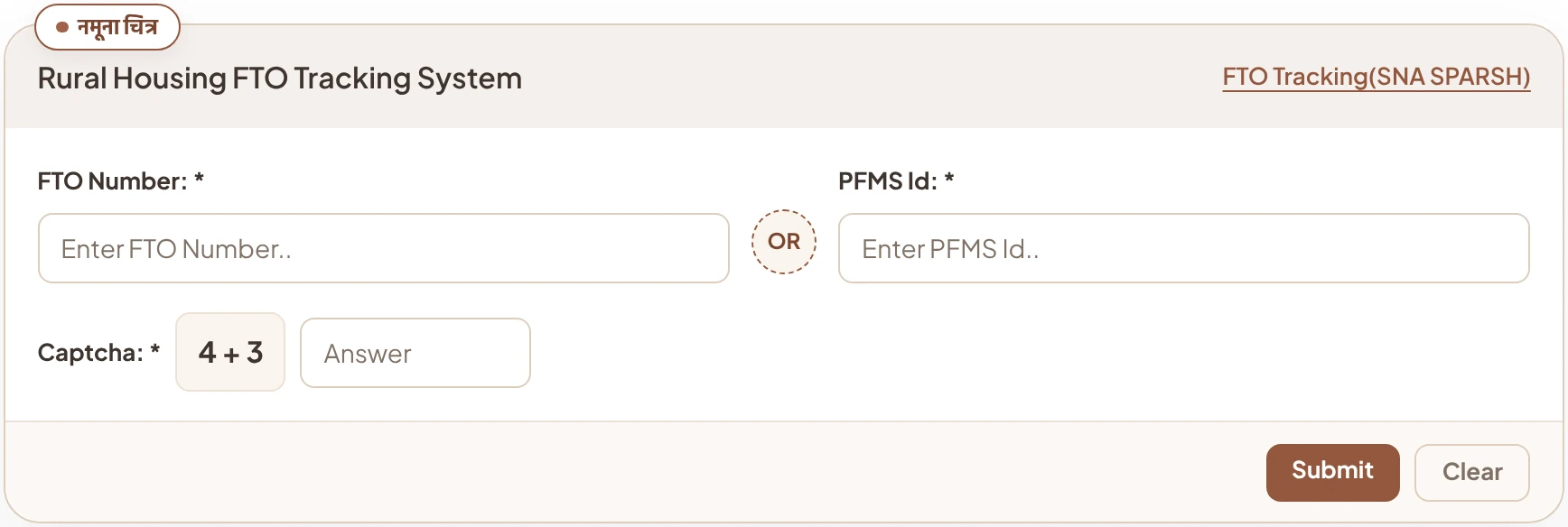
At the top right of the page there’s also a separate link called “FTO Tracking(SNA SPARSH)”. SNA-SPARSH is a newer system for paying out money from central government schemes. If your FTO doesn’t show up in the form above, try this link too.
What the 6 stages of FTO status mean
When you press Submit, the money’s whole journey is shown in 6 stages. A finished stage has a green tick and a date. The green bar at the bottom tells you which FTO number the status is for:
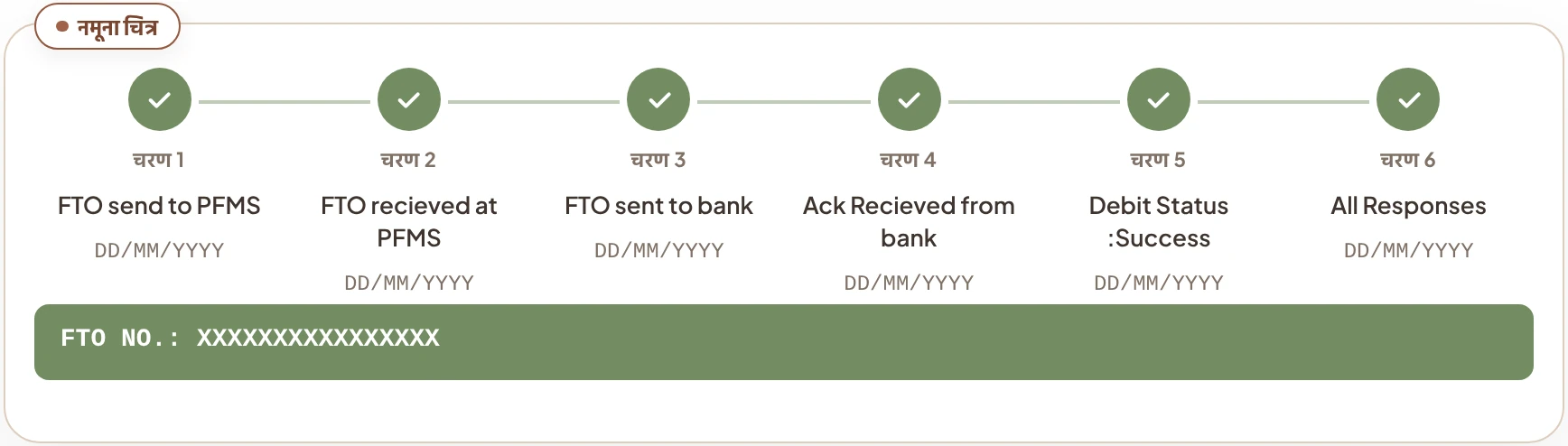
What each stage means, in plain words:
- 1. FTO send to PFMSThe FTO for the instalment was created and sent to PFMS.
- 2. FTO recieved at PFMSPFMS has received your FTO.
- 3. FTO sent to bankPFMS has sent the payment order to the bank.
- 4. Ack Recieved from bankThe bank has confirmed it received the order.
- 5. Debit Status :SuccessThe instalment amount has been debited from the scheme’s account and sent on its way to yours.
- 6. All ResponsesAll responses for this FTO are in, which means the whole process is complete.
If not all stages are complete, the last finished stage tells you how far the money has got. For example, if the order has reached the bank but Debit Status isn’t complete, the money hasn’t yet left for your account.
What to do if the FTO shows complete but your instalment hasn’t arrived
FTO tracking gives you a good idea of where the problem is. Talk to the right place based on what you see:
| What you see | What to do |
|---|---|
| All stages complete, but no money in the passbook | Go to the bank, get your passbook updated and check the entries. Match the account number and IFSC in the Bank Details of your beneficiary details with your passbook, in case the money went to another account. |
| Reached the bank, but Debit Status not complete | The money is still in transit. Check again in a few days. If it stays like this for a long time, take the FTO number to the block office. |
| Nothing opens when you enter the FTO number | Copy and paste the number again. If it still doesn’t show, try with the PFMS Id or on the SNA SPARSH link. |
| No FTO at all for the next instalment in the record | The instalment hasn’t been sent yet. The next instalment only comes after the geo-tagged photo of the previous stage, so ask the panchayat secretary whether the photo has been uploaded. |
If an instalment has been stuck for a long time, or someone asks for a bribe to get your money faster, be sure to complain. Here are all the ways to complain about PM Awas Yojana Gramin, from the panchayat to online. Mention the FTO number and its status when you complain. It helps them understand the case quickly.
Common questions about FTO tracking
What does FTO mean in PM Awas Yojana Gramin?
FTO means Fund Transfer Order. An online order is created to send each instalment for your house, and it has its own number. With this number you can see how far the instalment money has got.
Where do I get the FTO number?
On the official PMAY-G website, go to IAY/PMAYG Beneficiary under the Stakeholders menu and open your beneficiary details with your registration number. The FTO numbers of the instalments sent are shown there.
Can I check the status without an FTO number?
On the FTO Tracking page, you can enter your PFMS Id instead of the FTO number. You need one of the two.
Does Debit Status Success mean the money is in my account?
It means the instalment amount has been debited from the scheme’s account and sent to yours. To be sure, check the entry in your passbook or with your bank.
Is there a fee for FTO tracking?
No. FTO tracking is free on the official PMAY-G website. You don’t need to pay anyone for it.
What if there’s no FTO number for my next instalment in the record?
It means the instalment hasn’t been sent yet. Usually the geo-tagged photo of the previous stage of the house, or the block’s check, is still pending. Ask the panchayat secretary or block office whether the photo has been uploaded and checked.


Awas Score
House not sanctioned yet? Check your score first
See in 2 minutes how likely your family’s turn is to come.
Get my Awas Score